Qedit for HP 3000
 The full-screen editor for programmers:
- Twenty-five Years on the HP 3000, Distributed Worldwide
- Full Screen Editing with Cut-and-Paste
- Powerful Command Mode Automates Editing Tasks
- Tightly Integrated with MPE Operating System
- Interfaces to Popular Tools and Compilers
- Excellent Customer Support
- Now Also on HP-UX
|
Qedit Home PageQedit for MPE
User InfoTutorialsProduct manuals (HTML Help and PDF formats)
Other Qedit VersionsQedit for HP-UXQedit for Windows
SupportVisit our Support pageQedit FAQ Latest Release of Qedit Latest Beta of Qedit
Qedit TipsAll about line numbers!Retain trailing spaces Merging Lines Horizontally Excluding Lines from Visual Display Colcopy and Colmove Commands List Lines in a Fileset Combine MPEX and Qedit Variable Substitution in Qedit List Lines a Fileset How to Fill Columns Remove Trailing Blanks Find either of two strings Variable Count Items How to Undo Mistakes Check Comma-Delimited File Regular Expressions Repeating Commands Word Processing Tips Copy Same Block Many Times Trailing Spaces to Leading Zeroes Many More Qedit Tips |
Qedit for MPEAfter twenty years as Robelle's flagship product, Qedit is a feature-rich programmer's editor highly integrated with the HP 3000 operating system. Qedit provides everything a programmer needs to write COBOL, PowerHouse, and other programs in its integrated development environment.Qedit consists of an easy-to-learn full-screen mode for interactive editing and a powerful command mode for batch editing. In full-screen mode, you can look at your source code a page at a time; use the function keys and the command line to navigate through your file easily; perform cut-and-paste functions; split and splice lines, etc. Qedit's powerful command mode allows you to edit files in batch jobs and automate your editing tasks. Qedit boosts programmer productivity with an integrated development environment that you can stay in all day! Within Qedit you can do virtually anything that you can do at the MPE prompt: compile and run programs, execute UDCs and command files, browse through spoolfiles and data files for strings and patterns, and much more. Qedit can even trap compiler syntax errors and display the offending source lines one at a time for easy editing. "Qedit is wonderful. I live in it all the time. At home I have three of my terminal function keys defined as 'dial the office', 'hello', and 'run Qedit'." [Howard Robinson, CardKey Systems] Why buy Qedit?"Editor and Quad are free; why not use them?"Let's face it, the MPE world is changing rapidly. New operating system releases every few months, changes to networking and data communications, new terminals and terminal emulators - it never stops. If you want the peace of mind that comes from knowing a dedicated team of programmers and support people stand behind the editor you use all day, then Qedit is for you. At Robelle we never stop working on Qedit. Even as you read this, we are already working on next year's release by incorporating the many features and ideas that Qedit's thousands of demanding users have requested. Qedit is easy to learn and comes with complete documentation: an easy-to-read user manual, full-text on-line Help, and a Windows Help file for your PC. Our design goals of reliability, compatibility, performance, and functionality make Qedit the obvious choice.
|
Full-Screen with Cut-and-Paste
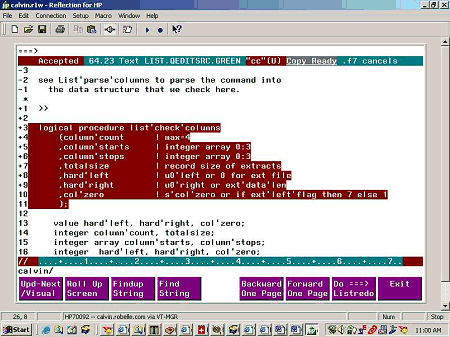
Use the full-screen mode of Qedit to develop and modify your source code. Editing is a breeze when you take advantage of Qedit's full-screen capabilities - look at your source code a page at a time; use the function keys and the command line to navigate through your file, and apply cut-and-paste functions to single lines or blocks of lines. The cut-and-paste functions allow you to move, copy, insert, and delete selections of text plus split and splice lines, format text, and more. You can even apply cut-and-paste operations across files.
Powerful Command Mode
Qedit's command mode allows you to edit files in batch jobs. Intelligent command files with parameter replacement and variable substitution even let you automate your editing tasks. Qedit's simple command syntax is easy to learn. If you are familiar with HP's Edit/3000, TDP/3000, or IBM's SPF editor, you already know Qedit's basic editing commands. Qedit also has powerful extensions that appeal to novices and experts alike."I have been using Qedit extensively to automate repetitive programming tasks using Qedit's command file feature. In particular, Qedit command files have been defined which greatly reduced the amount of time it took the Hospital to do its Year 2000 compliance programming. Qedit has significantly improved batch performance and increased programmer productivity."
George De Wolf, Middlesex Hospital
Stay in Qedit All Day
Qedit saves you time by providing you with an integrated development environment that you can stay in all day. In fact, the whole programming cycle can be accomplished from within Qedit which saves you time by avoiding the repetitious Keep-Exit-Compile-Edit-Text cycle. When you compile your current file from within Qedit, Qedit even traps compiler syntax errors and displays the offending source lines one at a time for easy editing. You can also run and test your program from within Qedit and easily return to the editing stage as required.Within Qedit you can do everything that you do at the MPE prompt: run programs, execute UDCs and command files, use the Listredo command history, run POSIX applications, and change directories. In addition, you can quickly access suspended processes that are frequently used, let your command files access your PC, browse through spoolfiles and data files for strings and patterns, and much more. With all this functionality, most Qedit users go into Qedit first thing in the morning and stay there until it's time to log off!
Qedit is integrated with HP 3000 languages such as PowerHouse, COBOL, FORTRAN, Pascal, C, and SPLash! Link it with popular utilities such as MPEX, Reflection, Adager, and Robelle's Suprtool database handyman.
"Robelle, you all need to be recognized for your ability to continually produce world-class quality software. As many programmers have said in the past: 'They'll have to pry Qedit out of my cold, dead hands.'"
Pat Shugart, Oaksoft Consulting, Inc.
COBOL Programmers Love Qedit!
Productivity features for COBOL programmers:- Automatic insertion of source tags
- You can compile and run programs from within Qedit
- Qedit traps compiler errors and navigates you directly to the offending source line for speedy correction.
- From within a COBOL source file, you can list the contents of a COPYLIB and Qedit displays just those definitions required by the program you are working on. You can also include COPYLIB members in string searches.
Attention PowerHouse Users!
PowerHouse users are especially pleased with Qedit's capabilities:- Edit source code in full-screen mode, then immediately invoke PowerHouse without leaving Qedit. Since Quiz, QTP, QDesign and Quick can run directly from Qedit, you don't have to Keep the code and exit from the editor. As a result, Qedit saves you valuable time and makes you more productive.
- Configure PowerHouse's Revise command to call Qedit's full-screen mode instead of calling the HP line-mode editor.
- It is easy to edit PowerHouse sub-files without losing their label information.
- Qedit coordinates source code access so that two programmers can't change the same file simultaneously.
Qedit is Fast
From the beginning Qedit was designed to consume the least amount of system resources and to perform as quickly as possible. You can use either regular editor files which you Text and Keep, or Qedit's own file format which gives you instant file access by eliminating the time-consuming Text and Keep steps. Quickly flip between files; Qedit remembers your last position in the file. Qedit files also save disc space, typically using only half the disc space of regular files.Smart Search & Replace
With Qedit's powerful search and replace capabilities, you can search for all occurrences of a string and either make global changes or apply your changes over a selection of lines. Qedit will even find occurrences of the string in a Copylib or Include file related to the file you are working on. When performing a string search with Qedit, you have lots of "smart search" options. For example, searches can be defined to exclude embedded words, ignore case, search only particular columns, look for matching patterns, etc. Now Qedit supports regular expressions which gives you even more control in defining your search patterns and rearranging text within your files.Your POSIX Editor
Most of the new technologies (e.g. Apache, Java, etc.) are implemented in the POSIX directory space. Qedit gives you a secure comfortable environment for working with these new technologies. From the same Qedit session, you can edit your MPE files and your POSIX files without running the POSIX shell. Qedit handles all types of files you are likely to encounter under POSIX: files with ACDs, files in nested directories, files with long filenames, and byte-stream format files. And just as you can run MPE applications from within Qedit, you can do the same with POSIX applications. Alternatively, if you are already in the POSIX shell, you can run Qedit from there and execute Qedit command files in POSIX directories.More Qedit Favorites
- Column editing
- Easy switching between files
- Redo command stack with Listredo searches
- Alternate, powerful, command Redo editors
- Edit bytestream, data and spool files
- The List feature to browse a file without texting it
- Multi-level Undo
- Spell Checker
- Hex editing
- Edit huge files - up to 99,999,999 lines long and 8172 characters wide
- Edit spoolfiles
- Automatic justification of text
- Sort lines alphabetically
- Edit data files
- Change margins and redo wordwrapping
- File comparison utility included
- Pre-pend and append text to a selection of lines
- Split and splice lines of text
Famous Robelle Support
Robelle is renowned for support you can count on. You get fast, responsive help by telephone, fax or e-mail from Robelle's experts. Additionally, you are entitled to an enhanced version of the software once a year and a subscription to Robelle's popular newsletter, "What's Up DOCumentation?".Migrating to HP-UX?
If you are migrating from MPE to HP-UX, we suggest you consider our the HP-UX version of Qedit. Same commands, same fast editing, same powerful functions. More information.